
How to Fill Out a New York RJI (UCS-840) Using Claude or ChatGPT
Claude and ChatGPT can help prepare a New York Request for Judicial Intervention. Here is how DocketDrafter helps them populate the official UCS-840 and UCS-840A PDFs.

Yes, Claude or ChatGPT can help fill out a New York Request for Judicial Intervention (RJI). Both can review the case information, figure out what belongs on Form UCS-840, and point out what is missing. The annoying part is getting that work into the official PDF. Without the right form workflow, you may still have to copy the answers out of chat, fill the form yourself, and fix anything that did not land correctly.
DocketDrafter closes that gap. It gives Claude Cowork and ChatGPT Work a prebuilt workflow for completing the official UCS-840 and its UCS-840A general addendum.
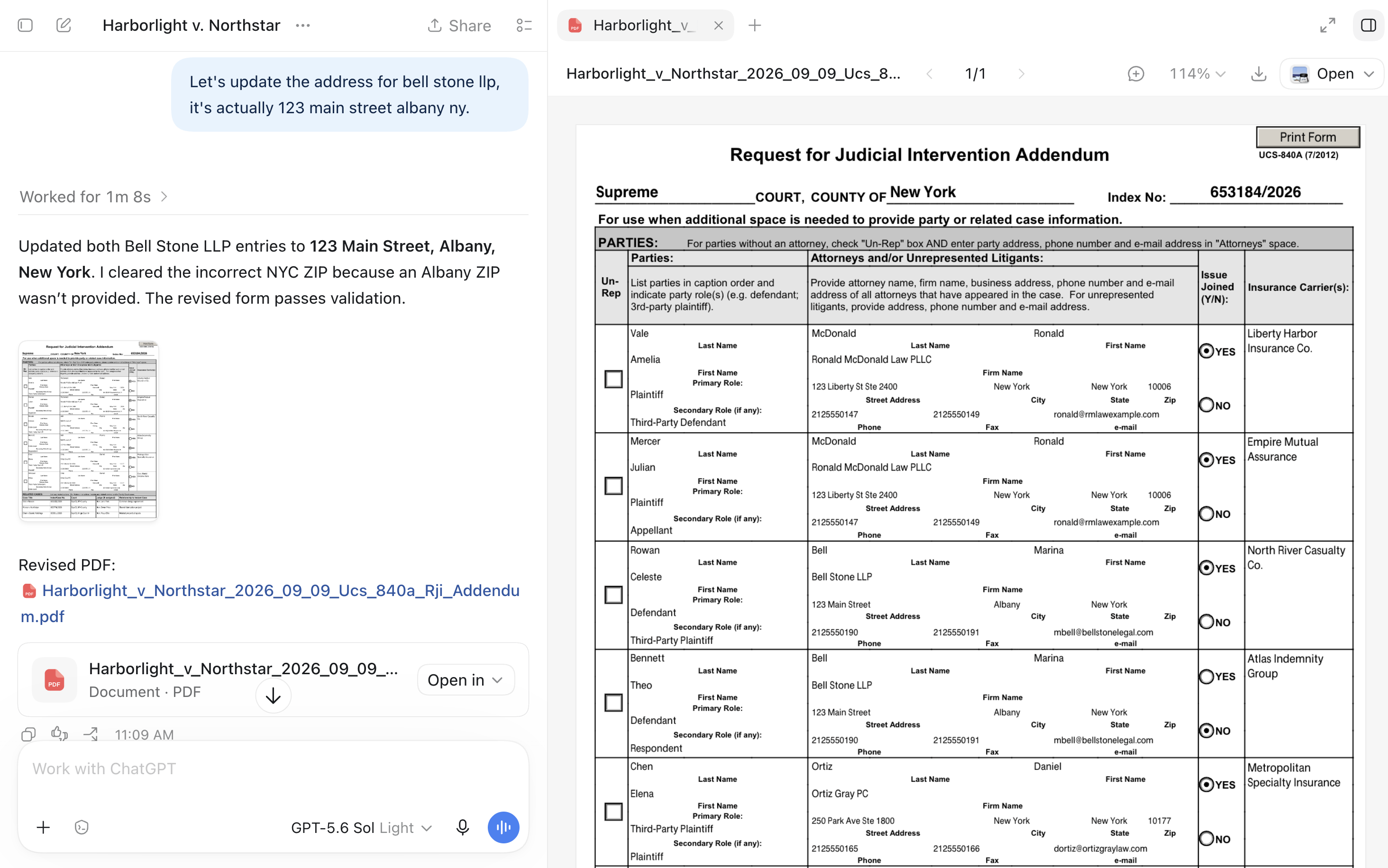
ChatGPT Work updating a UCS-840A addendum through DocketDrafter using fictional case information.
Can Claude or ChatGPT complete a New York RJI?
Claude and ChatGPT are well suited to the substantive part of the job. Give either one the complaint, caption, motion papers, service information, and any relevant case notes, and it can help organize information such as:
- the court, county, index number, and caption;
- the nature of the action or proceeding;
- whether pleadings have been filed and served;
- the type of judicial intervention requested;
- the relief requested and relevant return date;
- the parties, their roles, counsel, and insurance carriers; and
- any related cases.
The agent can also tell you when the materials do not answer something. That is often more useful than filling every field. A good instruction is simply:
Please complete the New York RJI from the attached papers. If something is missing, flag it for me instead of guessing.
But there is a difference between working out the answers and returning a completed UCS-840.
Why is the UCS-840 PDF the difficult part?
The RJI is not a blank Word document. It is an official court form with fixed text, dropdowns, checkboxes, defined fields, and limited space. The main form asks for several different kinds of information, and some matters require an addendum.
Uploading the PDF may let Claude or ChatGPT read it. That does not necessarily give the agent a reliable way to edit every field and return a usable copy.
In a normal chat workflow, you may get a helpful list of proposed entries but still need to:
- copy each answer into the PDF;
- select the court, county, action type, and requested intervention manually;
- fix text that does not fit;
- re-enter party and attorney information; or
- add another form when the main RJI runs out of room.
That is not really an intelligence problem. Claude and ChatGPT may understand the form perfectly well. It is a document-tooling problem.
Filling out UCS-840 with DocketDrafter
The setup is simple: install the DocketDrafter MCP in Claude or ChatGPT. There are no skills to configure, no Claude Projects to maintain, and no form prompts to build. Once it is installed, you can ask the agent to use DocketDrafter just as you would ask it to use any other tool.
For example:
Use DocketDrafter to fill out Form UCS-840 using the complaint and motion papers in this folder. Let me know what else you need from me.
Or, if the matter has a long caption or several related cases:
Use DocketDrafter to prepare the RJI. Add the UCS-840A if we need more room for the parties or related cases.
That is it. Claude or ChatGPT gathers the information, uses DocketDrafter's prebuilt form workflow, and returns the populated official PDF. You do not need to explain how the PDF fields work or manage a separate setup for this form.
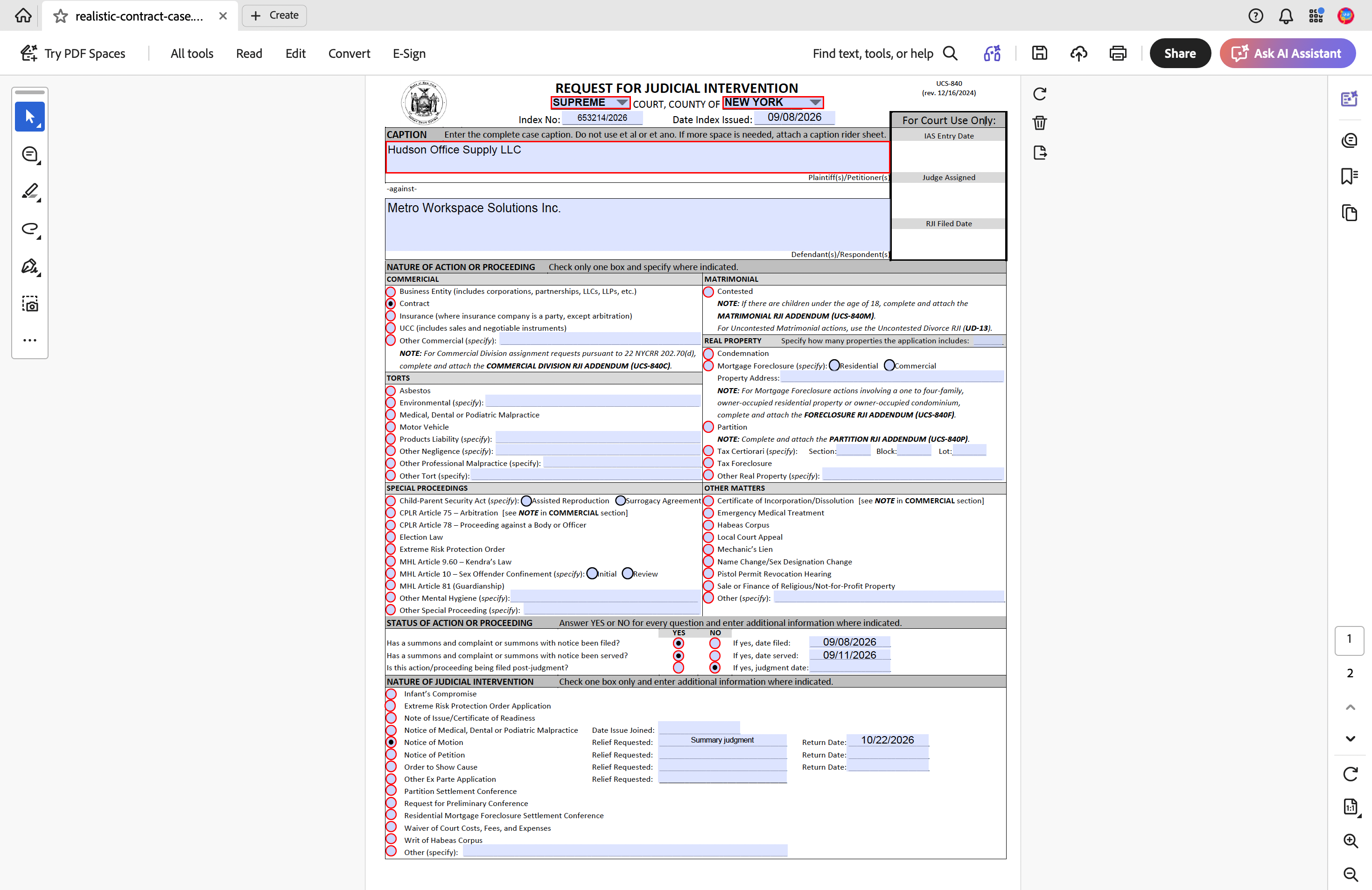
The populated UCS-840 opened in Adobe Acrobat.
Claude or ChatGPT supplies the reasoning, and the lawyer remains responsible for the entries, the correct forms, and the filing.
What is Form UCS-840A?
Form UCS-840A is the general Request for Judicial Intervention addendum. It provides additional space for party information and related cases when there is not enough room on the UCS-840.
That makes the two forms a natural workflow. Information already gathered for the RJI can be carried into the addendum instead of being typed again. Other specialized RJI addenda may apply depending on the type of matter, so the forms and filing requirements should still be checked before filing.
What DocketDrafter adds
For this workflow, Claude or ChatGPT remains the assistant you talk to. After you install the DocketDrafter MCP, DocketDrafter supplies the form and document layer behind it:
- the official UCS-840 and UCS-840A configured for agent use;
- reliable placement of text and form selections;
- no skills, projects, or form-specific prompts for the firm to maintain;
- a repeatable process attorneys and staff can use; and
- a populated PDF that can continue through the firm's normal review process.
The RJI forms are also part of DocketDrafter's broader New York litigation workspace, which includes New York Supreme Court and federal filing templates, Word and PDF production, firm letterhead, recurring document workflows, and hands-on customization.
You can see the New York litigation workspace or book a live walkthrough. No case materials are needed for the walkthrough.