
How to Create California Discovery Response Shells from PDFs with ChatGPT or Claude
Turn California form interrogatories, special interrogatories, requests for admission, and requests for production into formatted Word response shells using ChatGPT or Claude and DocketDrafter.

Yes, ChatGPT or Claude can turn California discovery requests into response shells. With DocketDrafter’s California litigation workspace, upload the PDFs served by the other party and say: “Use DocketDrafter to generate the shells.” You receive formatted Word documents with the caption, requests, corresponding response sections, and document structure in place. You can then ask the agent to help draft the objections and responses, subject to attorney review.
What is a discovery response shell?
A discovery response shell is the Word document counsel uses to prepare responses to discovery served by another party. It typically includes:
- the court and case caption;
- the propounding and responding parties;
- the discovery type and set number;
- each request or interrogatory;
- a matching response heading beneath each request;
- signature blocks; and
- any applicable verification and proof-of-service structure.
Creating the shell is mostly mechanical, but it can consume substantial attorney or staff time. Someone must copy every request from the PDF, preserve its numbering, apply the firm’s format, and create a response section in the correct place. Mistakes such as omitted requests, duplicate numbers, stale captions, and incorrect set numbers can be easy to introduce.
Which California discovery requests can become shells?
The workflow applies to four common types of California civil discovery:
- Form interrogatories (FROGs). For a form such as DISC-001, the workflow identifies the checked interrogatories and places those questions into the response document.
- Special interrogatories (SROGs). The workflow extracts the custom, numbered questions prepared by the propounding party.
- Requests for admission (RFAs). Each requested admission is placed above a corresponding response section.
- Requests for production (RFPs). Each document request is carried into a response shell where counsel can state objections and the intended production response.
These documents are not identical extraction problems. A special interrogatory set contains custom prose, while DISC-001 contains many standard questions but requires the user to answer only the selected interrogatories. A useful workflow must recognize the document type and handle it accordingly.
How to create the shells with DocketDrafter
1. Upload the discovery PDFs
Open Claude or ChatGPT and attach the discovery requests served by the other party. You can provide one PDF or a package containing form interrogatories, special interrogatories, RFAs, and RFPs.
2. Ask the agent to use DocketDrafter
Use a direct instruction:
Use DocketDrafter to generate the shells.
The agent can call the California workspace, identify the discovery documents, and create formatted response shells in Word. DocketDrafter supplies the configured document workflow rather than requiring the agent to invent the format during that conversation.
3. Review the shell
Confirm that the resulting documents contain:
- the correct case, court, parties, and set numbers;
- every applicable request and no unintended requests;
- the original request numbering, including any apparent source errors;
- a corresponding response section for each request; and
- the appropriate caption, signature, verification, and service information.
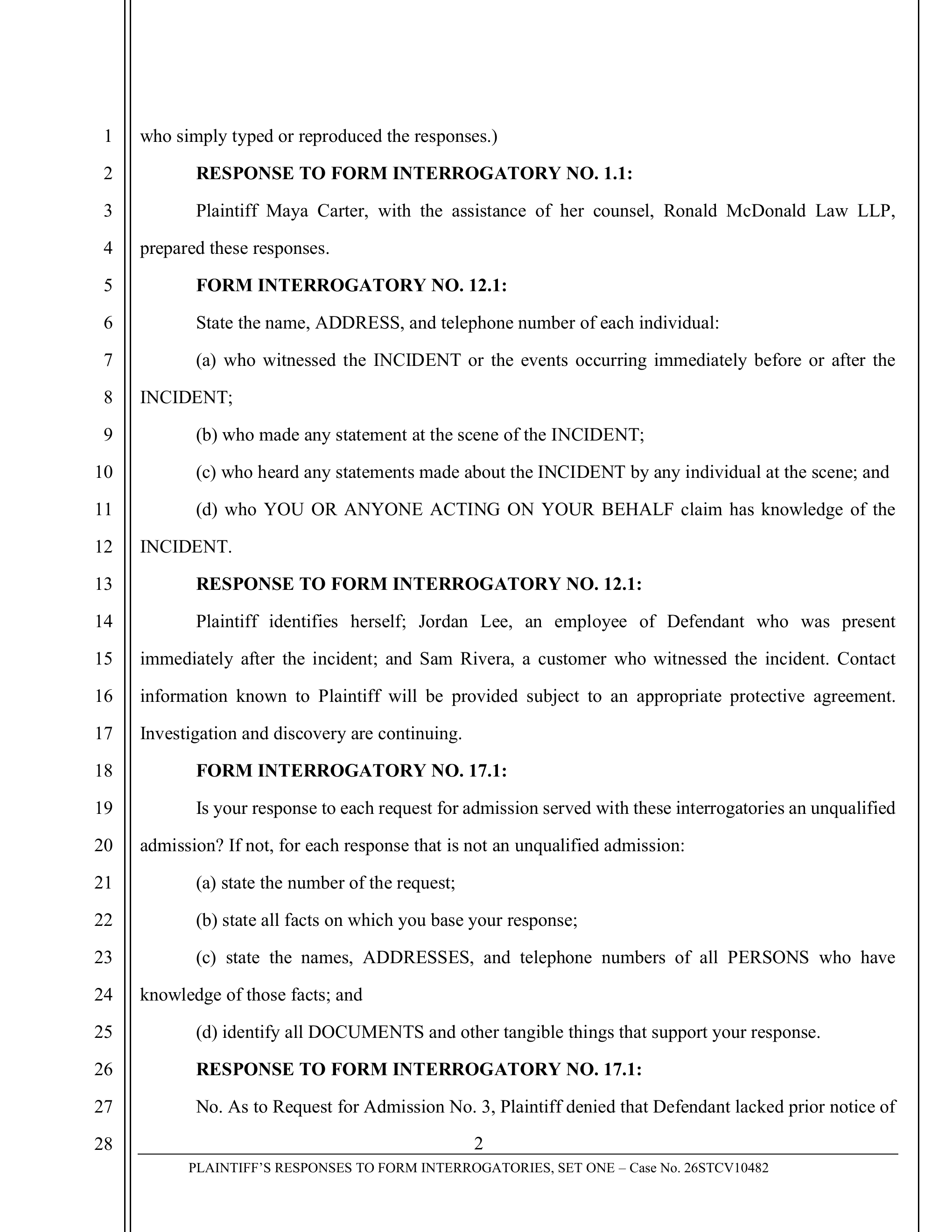
Each extracted request is followed by a structured response section so counsel can focus on the substance rather than rebuilding the Word document.
4. Continue drafting in the same conversation
A shell is only the starting point. You can then provide the relevant case materials and ask Claude or ChatGPT to help draft proposed objections and responses in the document.
The attorney remains responsible for the legal positions, factual accuracy, completeness, privilege decisions, current procedural requirements, and final approval. The advantage is that the agent begins inside a controlled document instead of producing loose answers that someone must later reformat.
Could you build this yourself with Projects, skills, and prompts?
Absolutely. A capable Claude or ChatGPT user could create a Project or skill, supply sample response documents, develop extraction prompts, and build scripts or instructions for generating Word files.
But making the workflow repeatable requires more than one successful prompt. The user must account for:
- checked boxes in Judicial Council forms;
- different PDF layouts and discovery types;
- request numbers that begin where a prior set ended;
- duplicate, missing, or inconsistent numbering;
- California pleading-paper and caption formatting;
- separate verifications and service documents;
- firm-specific styles and reusable language; and
- testing, documentation, staff training, and ongoing maintenance.
There is nothing impossible about building that system. The question is whether your firm wants to build and maintain it.
DocketDrafter provides the workflow as part of a broader California litigation workspace. The same workspace also supports California state and federal document formats, supported Judicial Council forms, Word and PDF production, document history, redlines, Word review workflows, and optional adaptation to the firm’s recurring documents.
Frequently asked questions
Can ChatGPT or Claude create California discovery response shells from PDFs?
Yes. They can read and reason about discovery PDFs, and with an appropriate document workflow they can create structured response shells. DocketDrafter supplies a prebuilt California workflow and formatted Word output through supported ChatGPT and Claude agents.
Can the workflow identify checked questions on DISC-001?
Yes. The California workflow is designed to identify the selected form interrogatories and include the corresponding questions in the response shell rather than copying every question printed on DISC-001.
Can Claude or ChatGPT also draft the responses?
Yes. After generating the shells, you can ask the agent to help prepare proposed objections and substantive responses using the case materials you provide. Counsel must review the requests, objections, facts, documents, and final responses.
Do we have to replace Dropbox or our existing case folders?
No. Your existing document system can remain the source of matter files. DocketDrafter serves as the maintained California litigation and document-production workspace that Claude or ChatGPT uses when preparing the response documents.
Do we need to create our own Project or skill first?
No. The discovery-response workflow is already configured in the California workspace. A firm can start with DocketDrafter’s house format and add its own letterhead, formatting, templates, and recurring preferences when useful.