
How to Fill Out a California CM-110 Form Using Claude
Claude can help prepare a California Case Management Statement, but filling the official CM-110 requires a reliable form workflow. Here is how to do it in Claude Cowork with DocketDrafter.

Yes, Claude can help fill out a California Judicial Council CM-110 Case Management Statement. But Claude alone may struggle to populate the actual form while preserving its fields, checkboxes, and layout. DocketDrafter adds a prebuilt CM-110 workflow to Claude Cowork: give Claude the case information, ask it to use DocketDrafter, and review the completed form before filing.
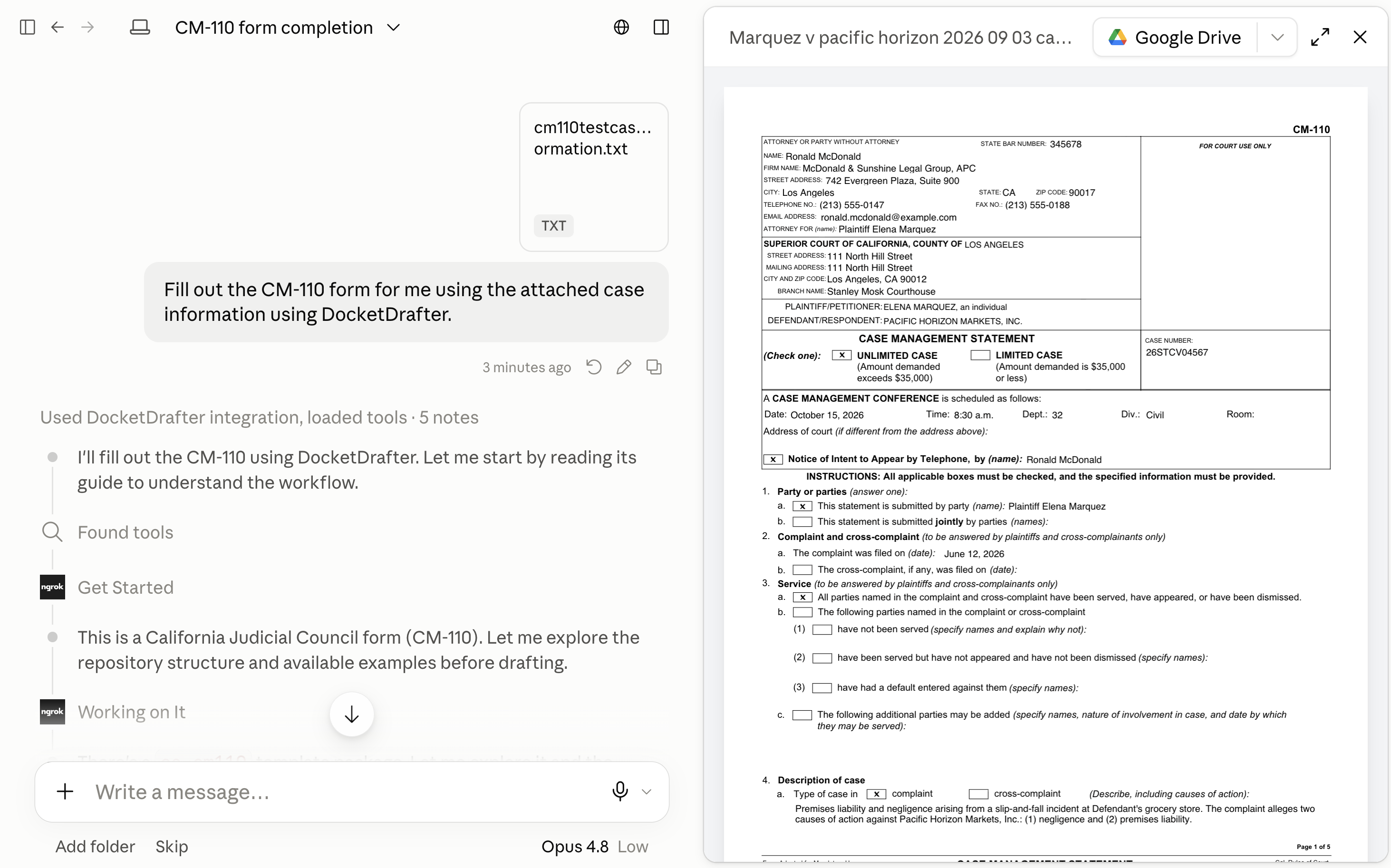
Claude Cowork populating a CM-110 through DocketDrafter using fictional case information. Attorneys should review every field, selection, date, and filing requirement.
Can Claude complete a CM-110?
Claude can read case materials, identify information relevant to a Case Management Statement, draft short descriptions, and flag missing facts. The harder part is turning that work into the actual CM-110.
That distinction matters. There are really three separate tasks:
- understanding the case information;
- deciding what information belongs in each part of the form; and
- populating the approved template without changing its fixed text or structure.
Claude is useful for the first two tasks, subject to attorney review. The third requires a controlled form-completion workflow. A conversational answer that lists proposed entries is not the same thing as a completed CM-110.
Why might Claude struggle to fill out the CM-110 PDF?
A motion is mostly prose placed into a familiar document structure. A Judicial Council form is different. It contains fixed language, defined fields, checkboxes, limited writing areas, and a layout that should be preserved.
In a Claude-only workflow, you may encounter problems such as:
- Claude can read the case information but cannot edit the form;
- Claude asks you to upload the CM-110 template again;
- the result recreates the form instead of populating the template;
- text appears outside the intended fields or exceeds the available space;
- checkboxes are omitted or handled inconsistently; or
- the process works once but depends on prompts and manual steps that another team member cannot reproduce.
This does not mean Claude is bad at legal drafting. It means drafting an answer and populating a fixed court form are different technical tasks.
How to fill out the CM-110 in Claude Cowork with DocketDrafter
DocketDrafter provides Claude with a prebuilt CM-110 workflow and the document system needed to create the populated form.
1. Provide the case information
Give Claude the materials containing the information needed for the Case Management Statement. Depending on the matter, that may include the complaint, caption information, proof or status of service, scheduling information, and notes about discovery, ADR, trial, and related proceedings.
Do not assume Claude can infer facts that are absent from the materials. Tell it to identify missing information rather than guess.
2. Ask Claude to use DocketDrafter
In Claude Cowork, use a direct prompt such as:
Fill out the California Judicial Council CM-110 Case Management Statement using the attached case information and DocketDrafter. Identify any required information that is missing rather than guessing.
Claude can then invoke the DocketDrafter integration, read the CM-110 workflow, and apply the supplied case information to the form template.
3. Review the populated form
The result is a populated CM-110 for attorney review—not a substitute for that review. Before filing, verify every entry, including:
- the court, branch, case caption, and case number;
- attorney and party information;
- selected checkboxes;
- filing and service information;
- the case description and other narrative entries;
- conference dates and appearance information; and
- any information Claude identified as missing or uncertain.
Counsel remains responsible for determining the appropriate answers, confirming the current form and applicable requirements, and approving the filing.
What does DocketDrafter add to Claude?
Claude supplies the reasoning and remains the interface where the attorney or paralegal works. DocketDrafter supplies the controlled form and document layer around it.
For the CM-110 workflow, that includes:
- a prebuilt process for completing the form;
- a maintained template rather than a form reconstructed in chat;
- controlled placement of text and checkbox selections;
- a repeatable workflow that can be shared with attorneys and staff; and
- setup assistance so the firm does not have to build and maintain the system from scratch.
The objective is not to replace Claude with another chatbot. It is to give Claude the specialized document system it needs for this particular task.
Can DocketDrafter use our firm's other California litigation templates?
Yes. The CM-110 can be part of a broader California litigation workspace that includes the firm's pleadings, motions, letters, and other recurring documents.
DocketDrafter can start with a prebuilt California setup and adapt the workspace to documents the firm already trusts. That allows the team to keep working in Claude while using shared templates, drafting guidance, formatting conventions, and controlled document history.
The firm does not need to abandon Dropbox or its existing source of client and matter files. DocketDrafter can serve as the maintained drafting and template layer Claude calls when a document needs to be created.
Frequently asked questions
Can Claude fill out the official CM-110 form?
Claude can analyze the case information and direct a form-completion workflow, but its ability to manipulate the form by itself depends on the interface and available tools. DocketDrafter gives Claude Cowork a prebuilt workflow for populating the CM-110 template.
Why does Claude ask me to upload the CM-110 template?
Claude does not automatically have a durable, editable copy of every court form in every conversation. Uploading a PDF may also let Claude read its contents without giving it a reliable method to populate the fields. DocketDrafter maintains the form workflow outside the individual chat.
Can Claude check boxes on a CM-110?
It can determine proposed selections from supplied information and instructions, but producing a usable form requires a tool that can apply those selections to the template. Every selection should be reviewed by counsel before filing.
What happens when required information is missing?
Claude should flag the missing information instead of inventing an answer. A useful prompt expressly tells Claude not to guess, and the completed form should be checked against the matter file before filing.
Can paralegals and attorneys use the same workflow?
Yes. One advantage of a prebuilt workspace is that the workflow does not have to remain inside one person's Claude Project, prompts, or personal automation. The firm's approved setup can be made available to multiple team members, with attorney review remaining part of the process.
Do we have to build the CM-110 workflow ourselves?
No. DocketDrafter provides a prebuilt CM-110 setup and works with the firm to configure its broader California litigation workspace.